

Cloud Enterprise
Organization credentials are only available on Lightdash Enterprise plans.For more information on our plans, visit our pricing page.
What are organization credentials?
Organization credentials are warehouse connection credentials created and managed at the organization level. They allow you to:- Centralize credential management: Admins maintain warehouse credentials in one place
- Improve security: Non-admin users can create projects without accessing sensitive credentials
- Simplify project creation: Users can select from pre-configured credentials instead of manually entering connection details
- Enable self-service: Team members can create projects independently without needing admin assistance
Organization credentials are compatible with preview projects, allowing the same secure credential workflow for both production and preview environments.
Who can use organization credentials?
Creating organization credentials
Only organization admins can create, edit, or delete organization credentials.
Using organization credentials
Organization developers or project admins can use organization credentials when creating or updating new projects. When creating a project, users can select from available organization credentials without seeing the underlying sensitive connection details such as passwords or access keys. You can also configure the custom roles to limit the access to the project creation feature.Setting up organization credentials
You must be an organization admin to set up organization credentials.
- Navigate to Settings in the Lightdash application
-
Under Organization settin
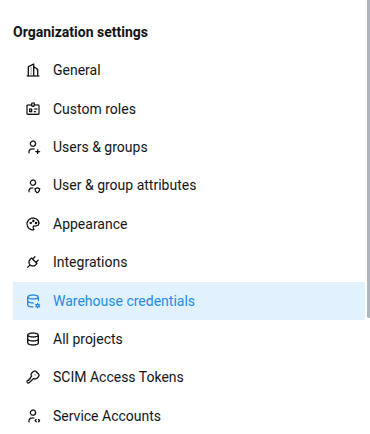
- Click Add new credentials
-
Enter the credential details:
- Name: A descriptive name for the credential (e.g., “Production Data Warehouse”, “Analytics Staging”)
- Connection details: Enter the specific connection information for your warehouse
- Sign in with Snowflake if you are not authenticated or authentication has expired
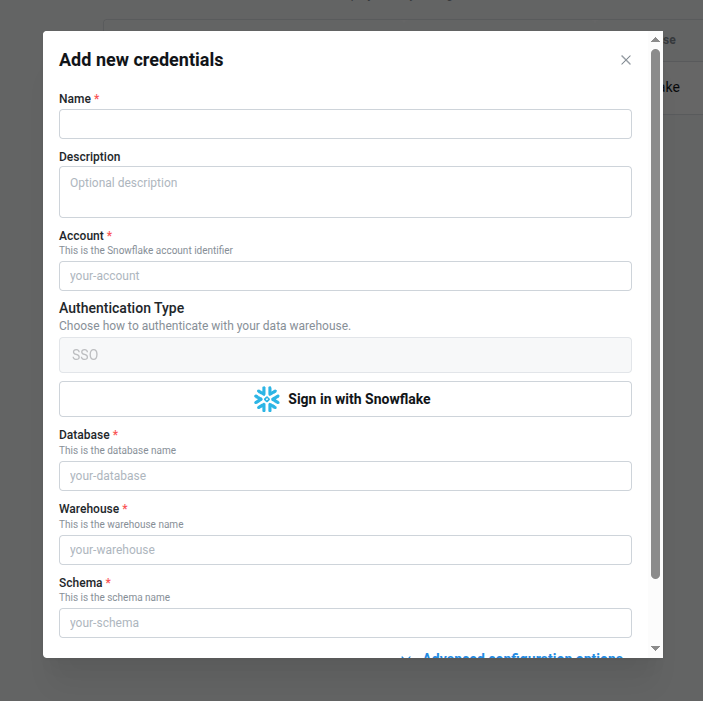
- Click Save to create the credential
Managing existing credentials
Organization admins can:- Edit credentials: Update connection details or credential names
- Delete credentials: Remove credentials that are no longer needed. This will not be possible if the credentials are already used by a project
- View usage: See which projects are using specific credentials
- Reauthenticate with SSO. If token have expired, you can
reloginandsaveso the credentials are uptodate with your latest tokens
Using organization credentials to create a project
When creating a new project in Lightdash:- Navigate to Settings —> Project management —> Create new project
- Enter a project name
- In the Warehouse connection section, now you’ll see an option to **Use organization credential, **select the previously created organization credentials. This option will not appear if you don’t have any organization credentials.
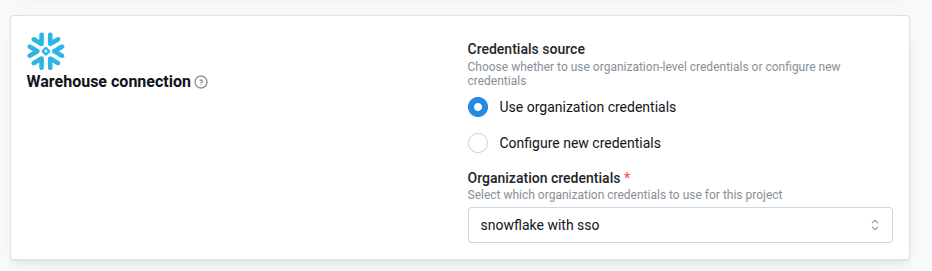
- Configure your dbt connection
- Click Create project
Organization credentials and preview projects
Organization credentials work seamlessly with preview projects. When you create a preview project from a parent project that uses organization credentials, the preview will automatically inherit those credentials. This means:- Preview projects created from the Lightdash app will use the same organization credential as the parent project
- Preview projects created via the CLI or GitHub Actions can also leverage organization credentials
Organization credentials and user credential requirements
If a project is configured to require user credentials, end users will need to provide their own individual warehouse credentials when accessing the project, even if the project was created using organization credentials.When “require user credentials” is enabled for a project, users will be prompted to log in with their personal warehouse credentials. These personal credentials will override the organization credentials for that user’s queries and data access.
- Project creation: Organization credentials are used to set up the project’s connection
- User queries: When the project requires user credentials, each user must authenticate with their own warehouse credentials
- Security compliance: This allows organizations to maintain audit trails and data access controls at the individual user level while still simplifying project setup
Related features
- Creating multiple projects: Learn more about project creation in Lightdash
- Preview projects: Understand how preview projects work with organization credentials
- Roles and permissions: Learn about organization admin permissions
- Personal warehouse connections: Understand individual user warehouse credentials